
Build your public business page step by step.
Add your business, submit your details, get reviewed, manage your page from the dashboard, and upgrade when you need more tools.
ContactTheBusiness helps business owners create a public business page with videos, photos, business details, contact options, and tools to improve the page over time.
How your business goes from submitted to public.
Add your business
Add the key details for your existing business. If your information is ready, this usually takes only a few minutes.
Verify your email
Confirm your email with a short code so your account, business submission, and future dashboard access stay connected.
Submit for review
Review helps keep public pages cleaner before they go live. Review time can vary depending on the submission.
Go public
After approval, visitors can see your public page, understand the business faster, and contact you through the available options.
Manage dashboard
Update details, improve media, manage contact options, check billing, and keep the page useful from one owner area.
Grow with Pro
Use Pro when the business needs more media, stronger contact tools, visitor insight, featured banners, and review replies.
Share and track
Share one clean business link and use Pro analytics to understand views, media activity, action clicks, and other visitor interest.
A clearer public page, without making things complicated.
Show what your business really does.
Use approved videos, photos, details, opening hours, and contact options to explain the business better than a plain name and address.
Share one clean business link.
Send your ContactTheBusiness page to customers, use it in messages, post it online, or link to it from your own website.
Start simple and improve over time.
Begin with a Free page after approval, then upgrade to Pro when you want more media, action buttons, analytics, banners, and review replies.
Your dashboard is your control room.
Business details
Update your description, category, address, opening hours, phone number, website, keywords, and service information.
Photos
Add approved photos so visitors can see your business, products, space, service, or work more clearly.
Videos
Show your shop, team, products, services, or work with approved business videos.
Logo
Add a logo so your business page looks more complete and professional.
Contact options
Help visitors call, email, visit your website, find your location, or use your selected action button.
Social links
Pro owners can add approved social links so visitors can find the business in more places.
Analytics
Pro analytics help you understand profile views, videos, photos, action buttons, social links, and banner interest.
Billing
Manage your Pro subscription, payment history, and invoice email requests from the billing area.
Start free. Grow with Pro.
Build a basic public page.
Free is useful when you want to create a public business page and start showing your business on ContactTheBusiness.
- Public business page after approval
- Owner dashboard access after approval
- Business name, category, location, description, opening hours, phone number, website, and basic details
- Up to 3 approved photos
- 1 approved video up to 1 minute
- Up to 5 keywords
- Shareable business page link
- Reviewed content before public display
More tools for serious visibility.
Pro is for business owners who want more media, better contact options, analytics, featured placement tools, and a stronger public page.
- Everything included in Free
- Up to 15 approved photos
- 2 approved videos up to 5 minutes each
- Up to 15 keywords
- Logo management
- Social media links
- 1 action button
- Featured banner options
- Analytics for videos, photos, action buttons, social links, and banners
- Review replies, billing dashboard, payment history, and invoice email request option
This is what the business owner is building toward.
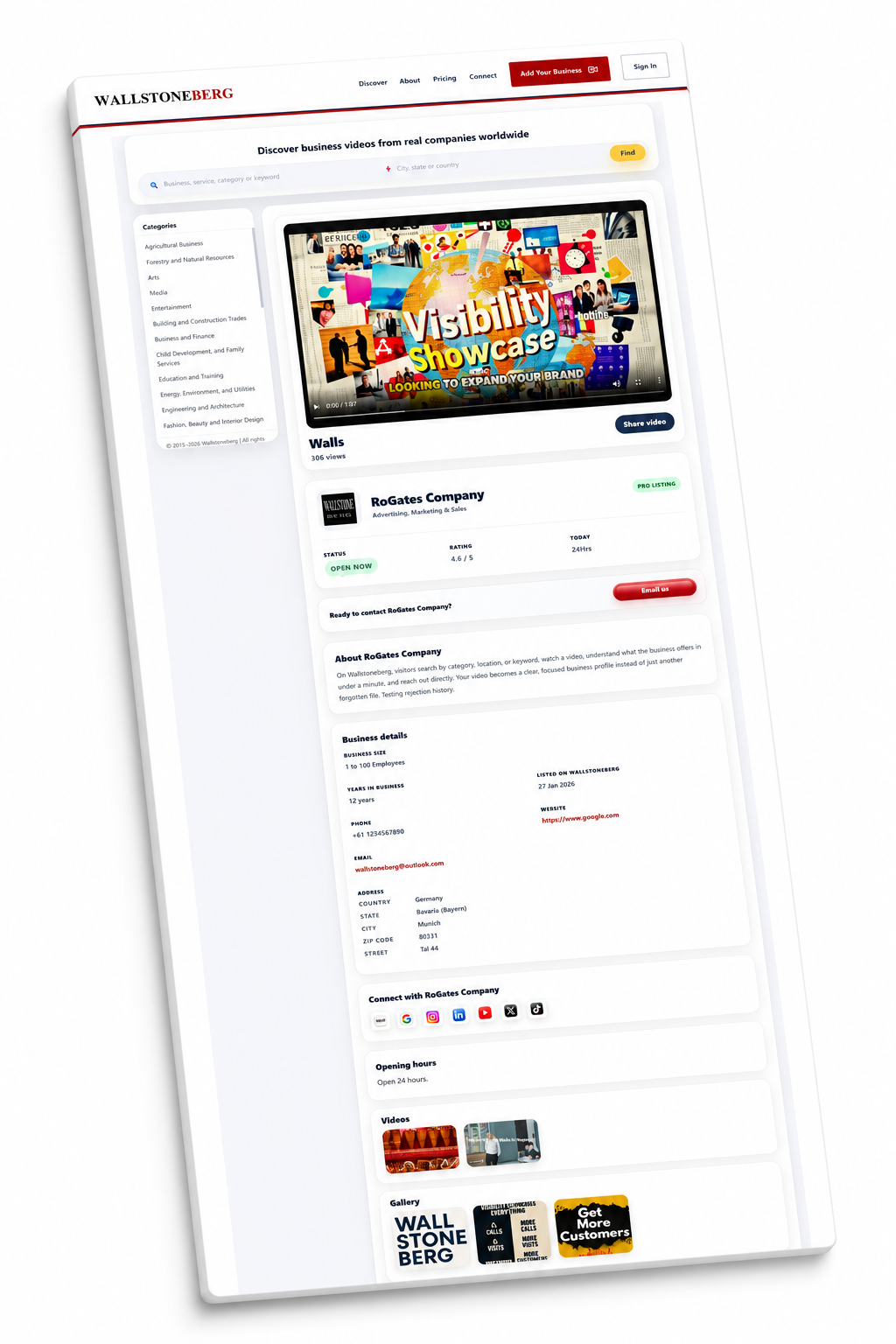
Reviewed before it appears publicly.
ContactTheBusiness reviews submitted public content for platform quality, but does not legally certify or guarantee every listed business.
Simple answers before you add your business.
Is adding a business free?
Yes. A business can start with a Free page after approval. Pro is available when the owner wants more space, more media, and more tools.
How long does submission take?
If the business details are ready, the owner can usually complete the submission in a few minutes. Public approval depends on review.
Can I edit my page later?
Yes. After approval, the owner dashboard is used to manage business details, media, contact options, billing, analytics, and notifications.
What happens if content is rejected?
Rejected content does not appear publicly. The owner can remove rejected media or submit a better version where the feature allows it.
What is the main difference between Free and Pro?
Free gives a starting public page. Pro adds more photos, longer videos, more keywords, social links, action buttons, analytics, featured banners, and review replies.
Can I share my business page outside ContactTheBusiness?
Yes. The public page can be shared with customers, in messages, in emails, online, or linked from another website.
Ready to build your ContactTheBusiness business page?
Start with a free page. Add your details, submit your business, and create a public page people can understand before they contact you.